
.avif)

Knowing how to use AI in construction comes down to one habit, deciding what to trust it with before you hand over the work. I learned that the hard way, after building my own AI estimating software and then shutting it down.
AI helps on construction projects, but only on the right tasks, and the fastest way to pick them is to ask what a mistake would cost. That is the low-risk versus high-risk test, and it works across every part of a project.
What Using AI in Construction Means
Using AI in construction means applying artificial intelligence (AI) tools, from general models like ChatGPT, Claude, and Gemini to computer vision on a site camera, to specific project tasks. It assists the person doing the work. It does not run the project or make the decisions.
Use AI as a tool you direct, supply with context, and review with care. Skill comes from choosing the right work for AI, then knowing how to judge the result.
The Low Risk vs High Risk Framework
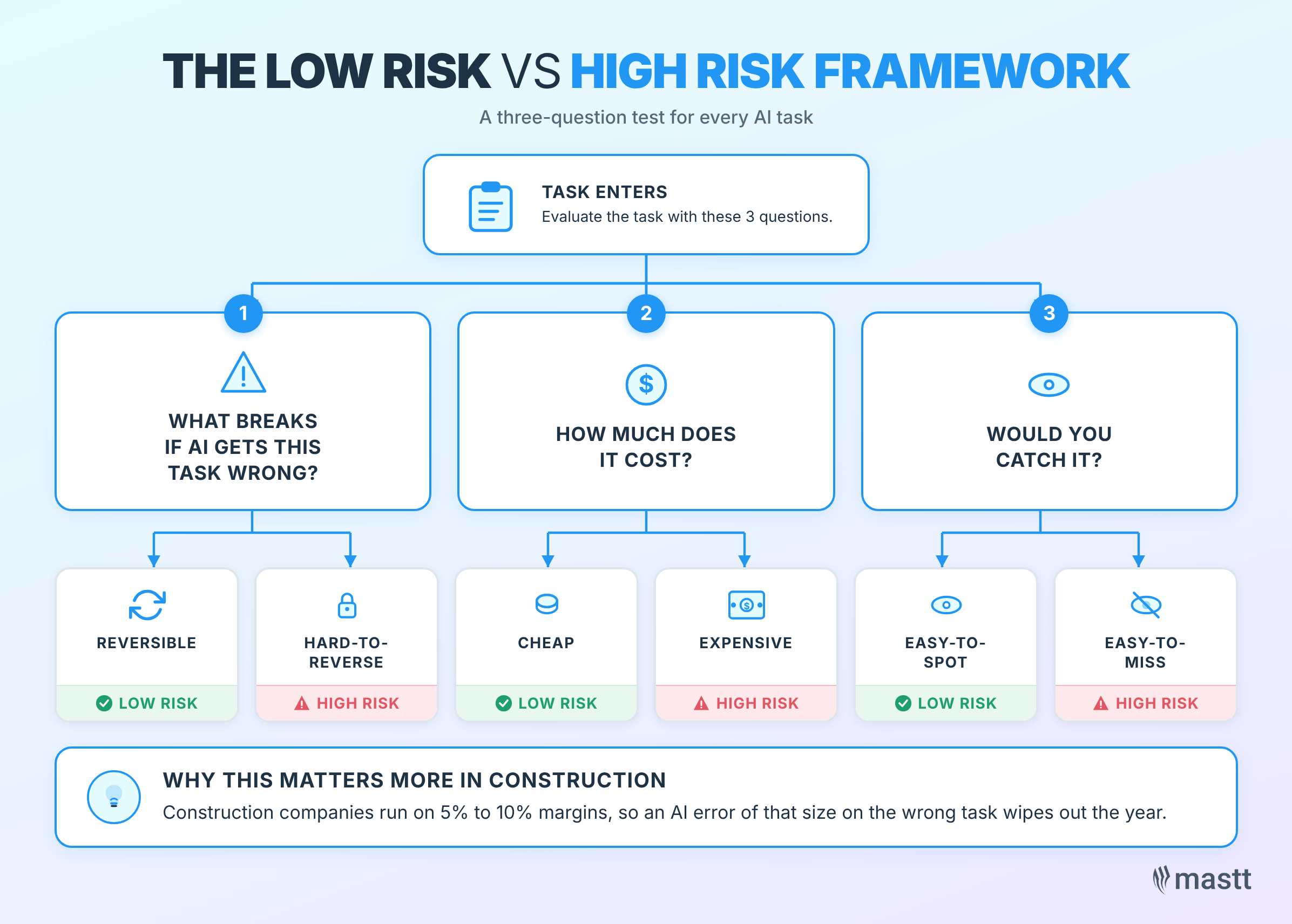
The low-risk vs. high-risk framework is a question test, asked of every task. Before anything else, ask what breaks if AI gets this task wrong, how much it costs, and whether you would catch it.
If the answer is cheap, reversible, and easy-to-spot mistakes, that鈥檚 low-risk, and AI can own it. 聽But if they鈥檙e expensive, hard-to-reverse, or easy-to-miss ones, that鈥檚 high-risk. It stays with a person.
This test matters more in construction than in most industries. Construction companies run on 5% to 10% margins, so an AI error of that size on the wrong task wipes out the year.
The classic misclassification is teams handing AI a full bid pack and asking it to summarize the scope. The work looks low-risk because it鈥檚 just a summary. The problem is that every downstream decision depends on the scope read being right, which makes it high-risk.
What Makes an AI Task Low Risk?
Low-risk AI tasks are the work you can safely hand off without checking every five minutes. They share a clear shape. The three traits below are the tests to run before letting AI take a task:
- Mechanical or repetitive: Structured input goes in, structured output comes out. There鈥檚 no judgment call buried in the middle.
- Easy to verify: A glance at the source document or template tells you whether the output is right.
- Cheap to be wrong: If AI butchers it, the cost is minutes of rework and not money.
If a task scores yes across all three, hand it to AI without second-guessing yourself.
What Makes an AI Task High Risk?
High-risk AI tasks stay on your own desk, even when AI gives a confident answer. The pattern is different from low-risk in three ways. Any one of them is enough to keep AI out.
A task is high-risk if any one of these traits applies:
- Judgment-heavy: The work depends on calls only experience can make, including scope, pricing, commercial intent, and site decisions.
- Expensive to verify: You need benchmark data, the original contract, or domain expertise to know whether the answer is sane.
- Expensive to be wrong: The cost is margin, missed scope, or a commitment to the client.
If any one of these is present, the task stays with a person. AI can help on a narrow sub-task you can check, but it doesn鈥檛 own the work.
Low-Risk AI Use Cases: Where AI Belongs Across Your Project
AI works best on project tasks that are repetitive, easy to verify, and based on information the project team can supply. The safest use cases follow a simple rule. Give AI the right inputs, use the output as a starting point, and keep judgment with the project team.
Drafting a first-pass project schedule
AI can turn project scope, milestones, access constraints, long-lead items, and key subcontractor packages into a rough schedule structure. The planner still owns the sequencing, durations, logic, and final program.
Finding information in project documents
AI can search specifications, RFIs, contract appendices, technical submittals, and other project documents to find a relevant clause or requirement. The task stays low risk when AI is used for retrieval, and the project team checks the source document before acting.
Brainstorming construction risks
AI can review the project scope, then produce a broad list of possible delivery risks. The value is breadth, so the project team filters the list using experience, project knowledge, and site context.
Updating standard project documents
AI can handle repetitive setup work such as changing project names, dates, and basic details across registers, templates, and standard forms. The work is mechanical, easy to review, and cheap to correct.
Turning SOPs into structured AI workflows
Existing procedures, such as supplier pre-qualification, RFI logging, inspection and test plan setup, and procurement checks, can be automated as repeatable AI workflows. The workflow carries out the steps, while the team retains control over judgment and approval.
Preparing project reporting inputs
AI can scan monthly reports, surface common issues, and identify items that may need executive attention. Program directors can use the output as a meeting starter, then decide what matters.
High-Risk AI Tasks: Where AI Needs a Human in Control
AI becomes risky when the task depends on commercial judgment, drawing interpretation, site context, or information that the model cannot see. These are the areas where a person needs to stay in control.
Construction estimating
AI should not be trusted to produce an estimate end-to-end. Construction estimating requires scope judgment, quantity takeoffs, market knowledge, inclusions, exclusions, subcontractor quotes, productivity rates, and historical cost data. A small estimating error can remove the project鈥檚 margin.
Reading construction drawings
AI still struggles with construction drawings because it interprets them more as images than as technical documents. Scale, line weights, hatching, callouts, dashed lines, hidden details, and drawing conventions can be missed or misread. Tools marketed as an AI blueprint reader are improving, but a person still checks every number that comes off a drawing.
Quantity takeoffs
Quantity takeoffs rely on accurate counting and measurement from drawings. AI can help with structured outputs after the takeoff, such as extracting rates or updating a spreadsheet. The counting itself should stay with a person or a purpose-built takeoff tool.
Interpreting tender (bid) scope
Tender (bid) submissions require careful review of the bid documents, scope of works, contract conditions, and drawings. Using AI to shortcut the scope read can leave the estimator without the background knowledge needed to price the work properly.
Making decisions based on site context
AI cannot see site walks, weather impacts, informal client comments, phone calls, or face-to-face conversations. Decisions that depend on real-world project context need the project manager鈥檚 judgment.
Replacing human responsibility
AI can support decisions, but the person using AI is still responsible for the output. The safest approach is to treat AI as a tool that needs direction, project data, and review.
AI Tools Construction Teams Use
Most teams start with general AI models and add construction software that has AI built in. The general models handle ad hoc thinking, the software handles structured, data-backed tasks.
- General models: ChatGPT, Claude, Microsoft Copilot, and Gemini for drafting, summarizing, and analysis.
- Construction platforms: Tools that hold your cost, schedule, and risk data so their AI answers from your project, not a blank slate.
- Specialist tools: Computer vision for safety, takeoff tools for quantities, and estimating software for pricing.
For a current comparison of the named options, see 91爆料's AI construction tools roundup.
How to Use AI in Construction: Start With One Workflow
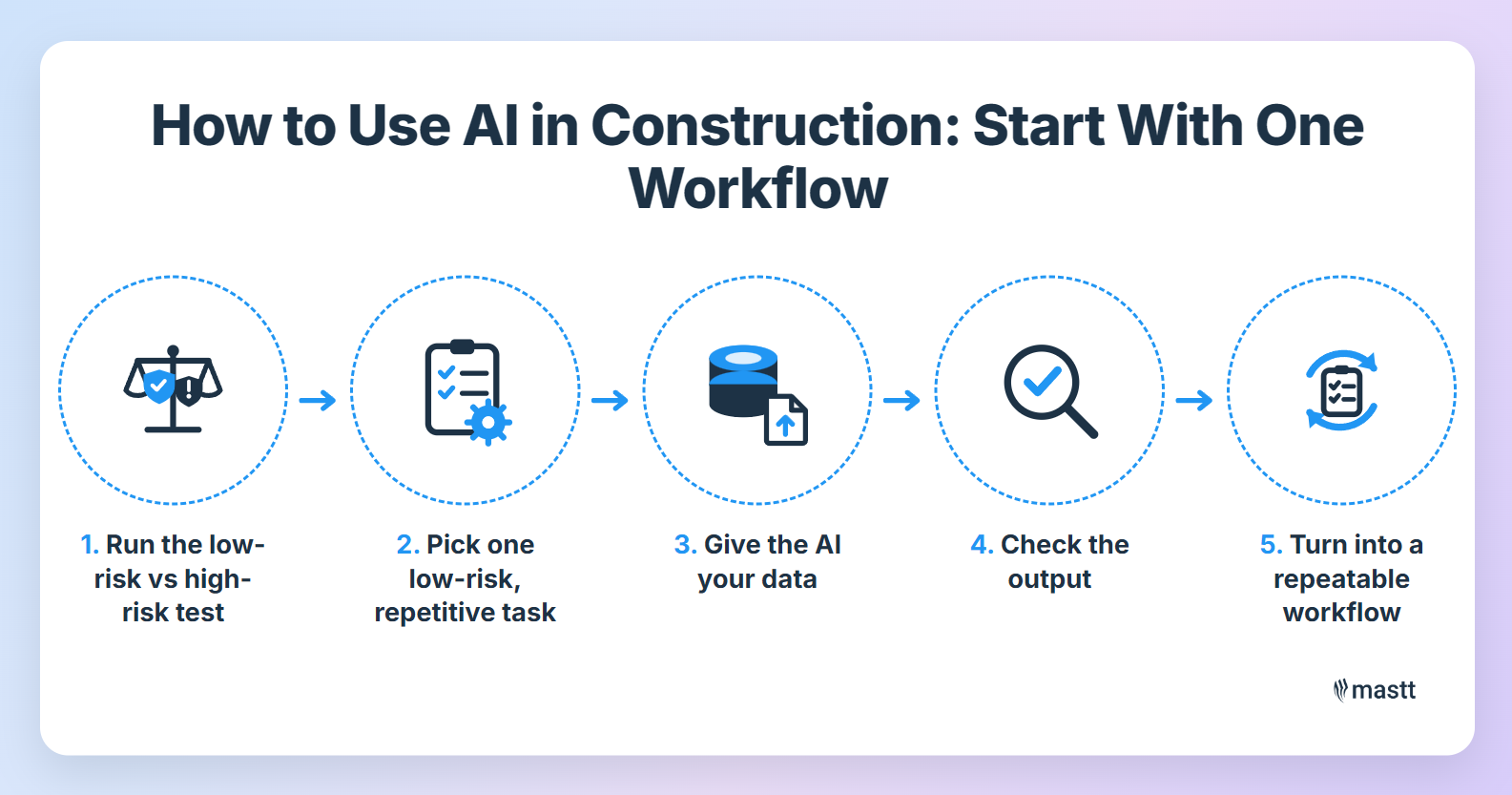
The fastest way to get value from AI on a construction project is to ship one small low-risk workflow today. Forget the sweeping AI strategy.
I鈥檝e watched teams burn months designing an AI plan before they鈥檝e used AI on anything real. Pick a task, give the AI what it needs, and check the result.
Step 1: Run the one-question test and score your tasks
Before anything else, ask what breaks if AI gets this badly wrong. Then, score every task on consequence and on detectability. The consequence is what a wrong answer will cost your project or your business. Detectability is how easily you would notice the error before it does damage.
Low on both, and the task is safe for AI. High on either, and a person leads. It is the same judgment you already use when you delegate to a junior, applied to a tool that does not learn on its own.
Step 2: Pick one low-risk, repetitive task to start with
Choose something cheap to get wrong and easy to verify. Reformatting a defect register, drafting a routine RFI, or building a payment request from a template all fit the bill. You want a task you repeat often, so the time you invest pays back.
Step 3: Give the AI your data and the output format
Hand the AI the real inputs, like your rates, your template, and the source documents. Then tell it exactly what to produce, because AI is a data transformation tool. You give it the input information, you tell it what to do, you tell it the output format. The output is only as good as the context you provide.
Step 4: Check the output
Read the result the way you鈥檇 check a junior鈥檚 work. If it lands outside what you know to be reasonable, fix the input or the instruction instead of accepting it. You stay responsible for the output AI produces.
Step 5: Turn what sticks into a repeatable workflow
Once a workflow proves useful, write the prompt and steps down so the whole team runs it the same way. Convert it into a Claude skill or an equivalent structured workflow. That鈥檚 the move from ad hoc usage to repeatable ones.
Where AI Earns Its Place in Construction
AI earns its place when you point it at low-risk work, feed it your own data, and keep a person on the calls that carry real consequences. The teams getting value are not the ones with the grandest AI plans; they are the ones who shipped one useful workflow and built from there.
The one thing I would tell any team is not to try AI once and decide it does not work. You have to experiment, classify, and keep the responsibility on you. Run this framework on every new AI task that lands in front of you. Pick one workflow this week, classify it honestly, and let the result tell you whether it belongs with AI. I cover more on using AI across construction on .

Written by
Timothy Fairley
Timothy Fairley is the Founder of ConstructIQ and a Chartered Professional Engineer and PMP with 9 years delivering construction projects across renewable energy, rail, and infrastructure. He trained over 50,000 construction professionals worldwide through ConstructIQ鈥檚 courses and YouTube channel on estimating, procurement, and contract management. Timothy contributes content on construction cost management and estimating at 91爆料.

Contributions by

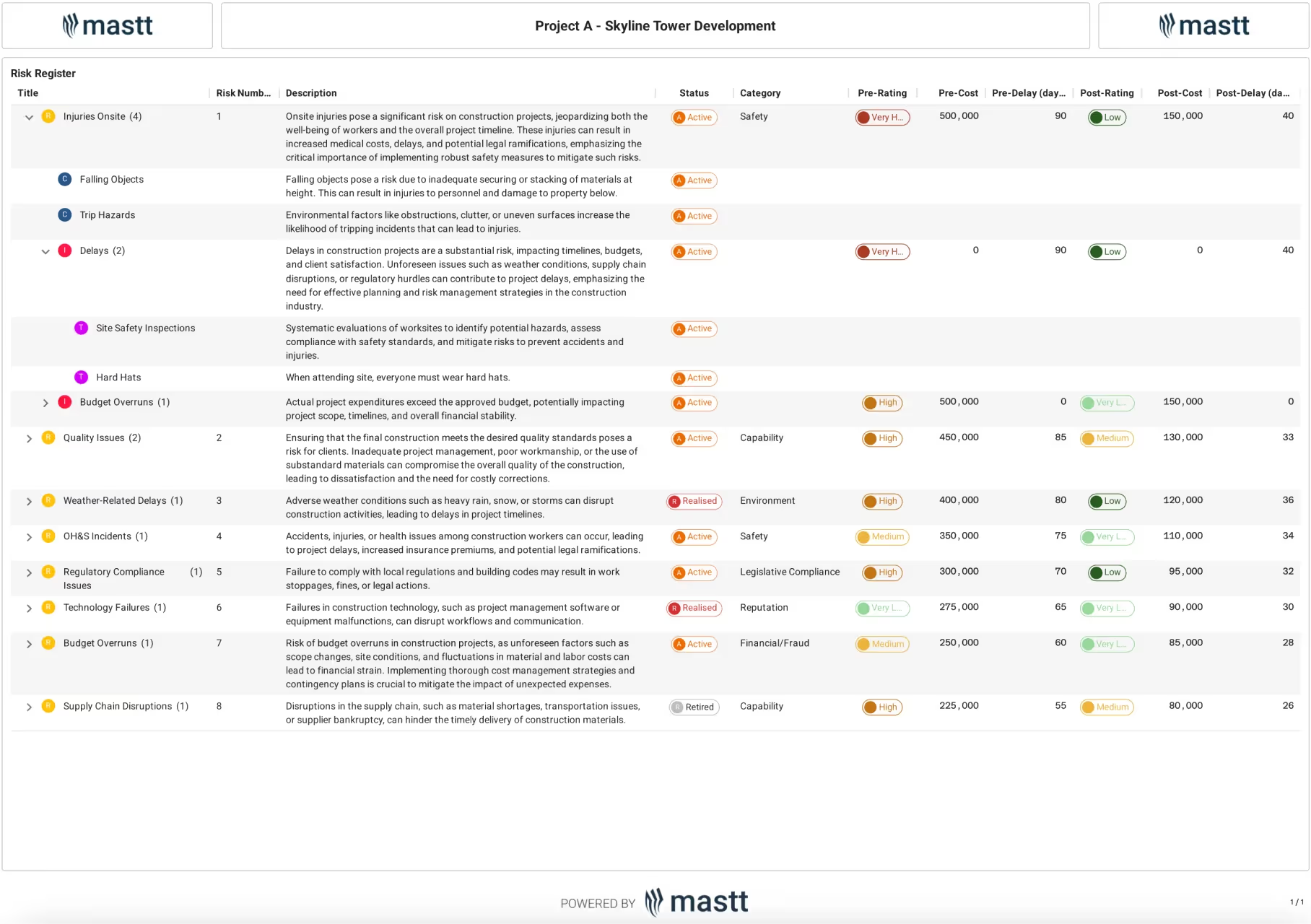
Risk Assessment Template
Use this Risk Assessment Template to identify risks, assign ratings, and track mitigation plans in a consistent format that keeps construction projects safe and compliant.

Walk Into Every Meeting With Confidence, Clarity, and Control
No one wants to look unprepared, blindsided, or uncertain in front of stakeholders 鈥� but that鈥檚 exactly what happens without 91爆料.
Start for FreeTrusted by the bold, the brave, and the brilliant across governments, Fortune 500s, and the world鈥檚 best in delivering the future